
Sessions and panes
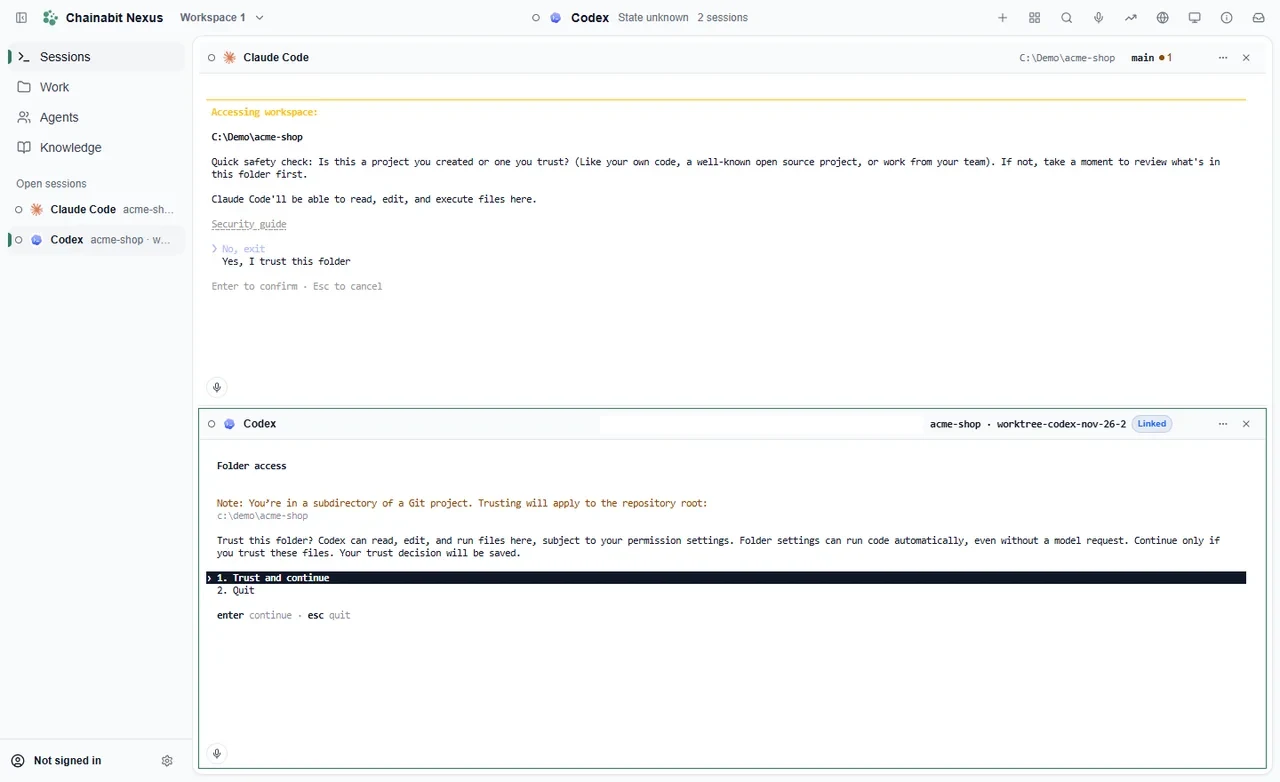
A session is one tool running in one folder: an agent such as Claude Code, or a shell. A pane is its place in the window. Sessions belong to a workspace, and each window shows the sessions of its workspace.
Start a session
New session asks for a Folder and an Agent tool, and offers Work in a separate copy and Run on a local Ollama model. If another agent already works in the folder you choose how to start; see Run Claude Code and Codex side by side. Only a person starts sessions: nothing received from sync or from another agent starts one.
Read a pane
The header shows the tool, the folder, the branch with a change count, and the working-copy badge. The dot shows the state (Starting, Working, Waiting for you, Done, Exited). Right-click or open More for the menu: Copy, Paste, New terminal in this folder, Rename, Color, Focus Mode, Collapse to strip, Move to another window, Clear, Close, and Review the work when a task waits. In the terminal you can find text (Find…), and web links open in your browser (only web links).
Control a pane
| Action | Effect |
|---|---|
| Pause / Resume | While paused, what you type is not sent. |
| Stop | Ends the process. |
| Restart | Starts the tool again in its folder. |
| Close | Closes the pane; "Their processes are stopped. Work in progress stays in each folder; nothing is deleted." |
Closing all sessions is in the palette: Close all sessions…
Arrange
Layout: Focus (1 panel), 2, 3 or 4 columns. Drag a header to swap places, drag a divider to resize, Collapse to strip to shrink a pane to a row you can restore. Panes keep their layout.
Details panel
Details shows the focused session's state, tool, task, start time, whether Nexus confirmed the start, its color, and the Context received from other agents.
The chat view
Agy, OpenCode and Hermes can open in a chat view with a message box instead of a terminal. In a terminal view, a toolbelt under the pane (Write here) offers quick input. Attach a file with Attach a file.
Quitting
Quitting stops every process in the panes. By default Nexus asks first ("Quit Nexus with N running sessions?"); you can choose Don't ask again.