
Opening a folder that holds many repos
Goal: create projects from a folder such as C:\Demo\repos that contains several git repositories, without giving an agent more reach than you intend.
Why it matters
An agent started in a parent folder can reach every repository inside it. Nexus tells you before that happens.
1. Create the project
In Work, choose the plus next to Projects (New project), then Choose… for the folder.
2. Read the notice
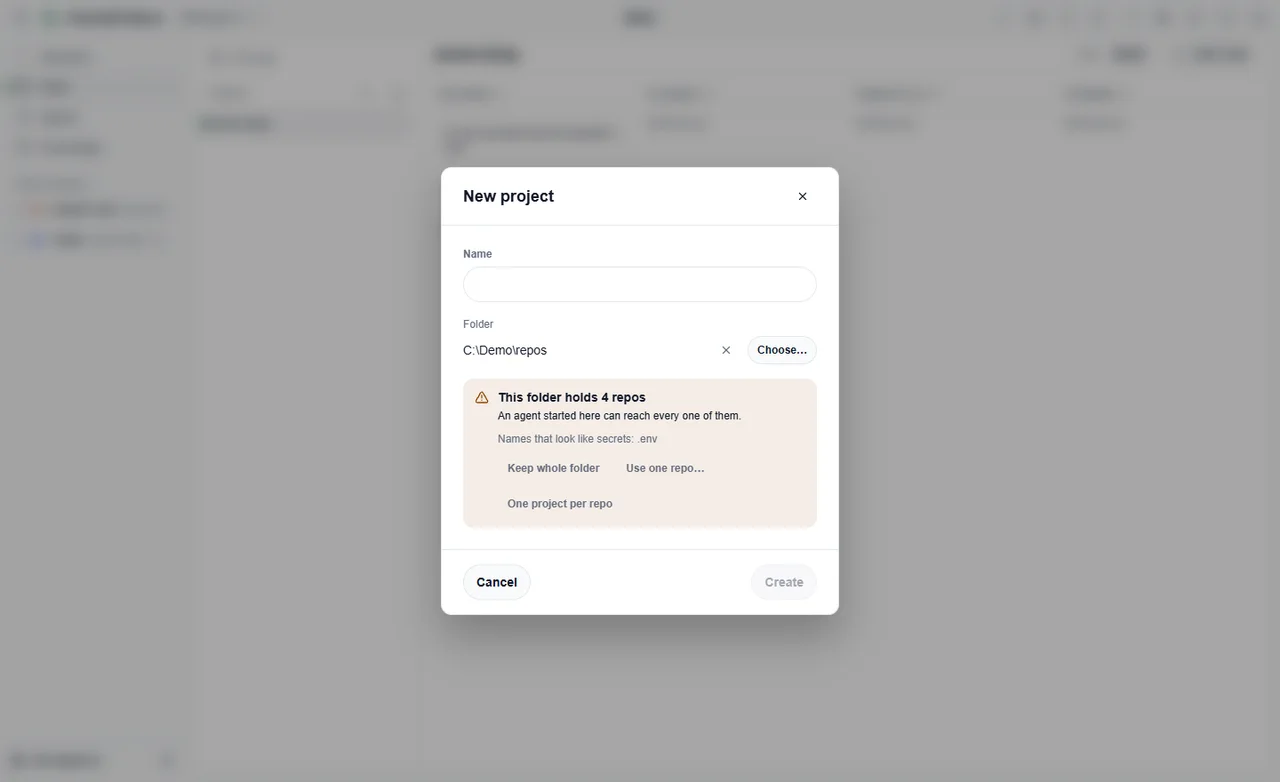
Nexus shows This folder holds N repos and "An agent started here can reach every one of them." If the folder has files with names that look like secrets, it lists them (Names that look like secrets).
3. Choose
- Keep whole folder: one project for the folder. Nexus notes "Keeping the whole folder. Agents started here can reach all N repos."
- Use one repo…: pick a single repository (Choose a repo). The project covers only that repo.
- One project per repo: creates a project for each repository ("Created N projects."). It works for a limited number of repos, and Nexus says how many; if some could not be made it says "Created X of N projects. The rest were not made."
4. Too broad
Your home folder, a drive or a system folder cannot be a project: "This folder is too broad to be a project." Pick a project folder instead.
5. Not a git repository
A folder that is not a git repository still works, but Nexus cannot show changed files or diffs there.
Result
Each agent can reach only what you decided. If you later start an agent in Bypass All in a parent folder, Nexus asks again; see Choosing Ask, Auto or Bypass safely.