
Syncing a project with Chainabit
Goal: decide per project whether it is local or synced, and know what syncing sends. You need: to be signed in with a Chainabit account for synced projects. See Sign in and license.
What leaves your device
When you create a project that syncs, only the project's id and title are sent to Chainabit for the project itself. The folder path, file names and contents stay on this computer. Tasks you add or edit in a synced project are synced too, and agents work only in your local folder.
1. Choose the default for new projects
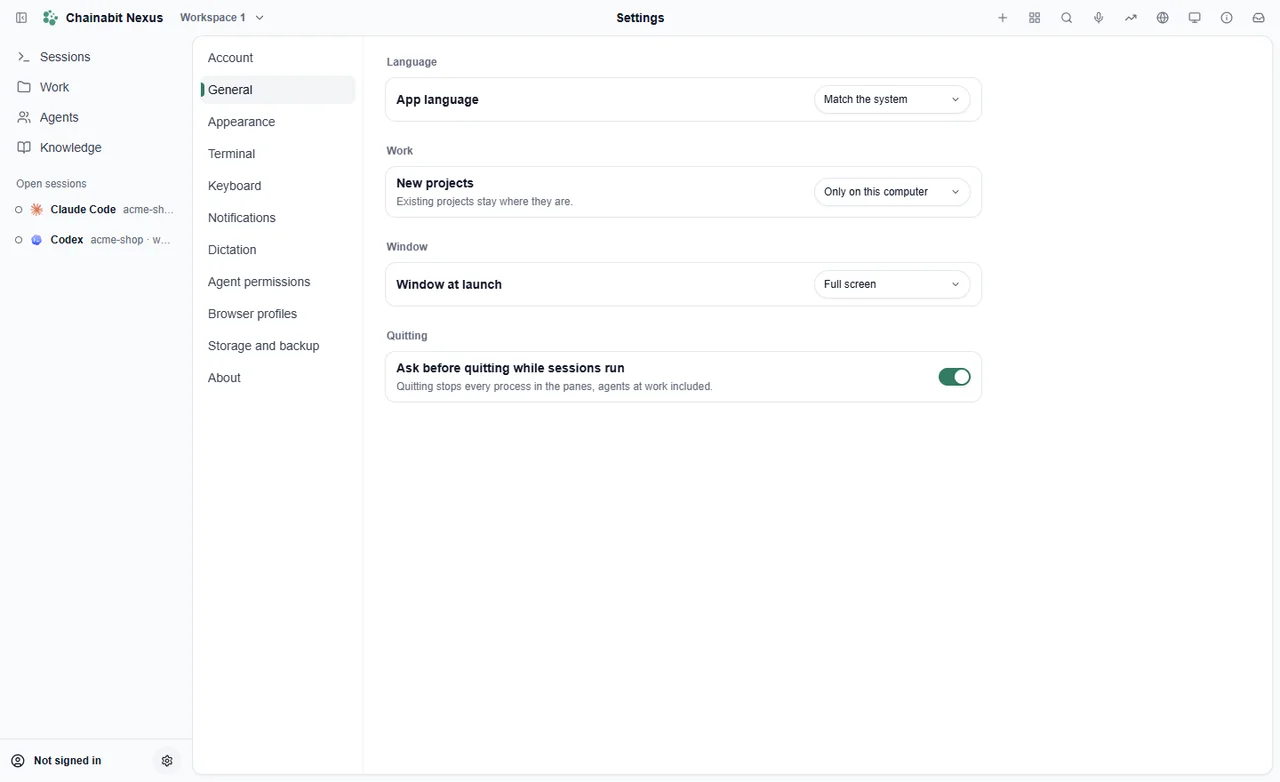
Settings, General, New projects: Only on this computer or Synced with Chainabit. Existing projects stay where they are. You can also choose it in the first-run setup.
2. Choose per project
In New project, the Sync with Chainabit option decides that project. Each project shows its scope: Only on this computer, Synced with Chainabit or Sending to Chainabit. If Chainabit cannot be reached when you create it, Nexus keeps the project and says it goes to Chainabit when it can be reached.
3. Sync
The Work header shows Synced at a time, Syncing…, Offline or Not synced yet. Choose Sync to sync now. Changes you make while offline are saved on the device and sent when Chainabit can be reached. If Chainabit refuses a change, Nexus shows the reason and does not work around it.
4. Signed out
Without a sign-in you can still read synced projects but must Sign in to edit.
Result
You know what each project shares. Nothing synced starts work on your computer: sessions start only when you start them.