
Work and tasks
Work lists your projects on the left and the tasks of the selected project on the right. Some labels in the app call a task a Bit, for example "Bits of project".
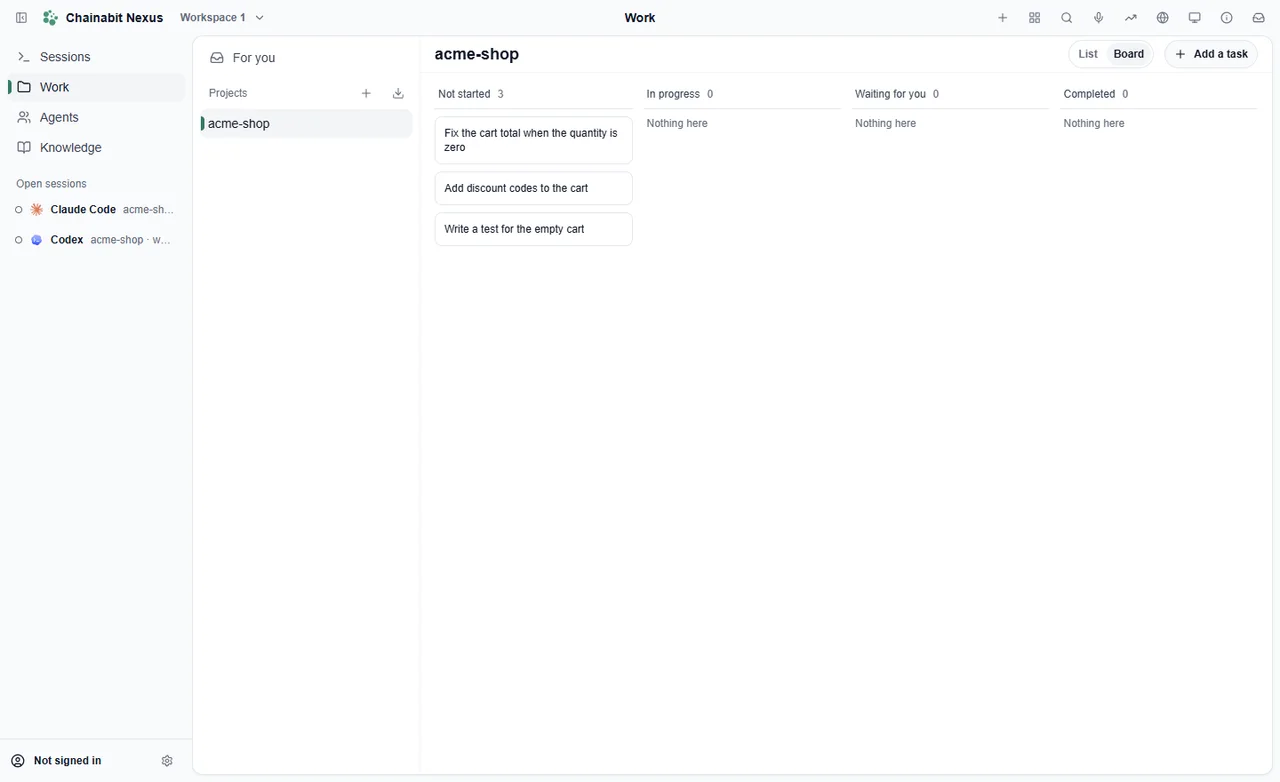
Projects
A project points at a folder on your computer. It is Only on this computer, Synced with Chainabit or Sending to Chainabit. Create one with New project, or import projects from Chainabit with the import button. See Syncing a project with Chainabit.
Tasks
Add a task with a Title, an optional Note that the agent sees, a Priority (Urgent, High, Medium, Low) and a Due date. Open a task to Edit it or read its History, which Nexus writes from what it measured, not from what the agent said. The agent sees a change at its next turn.
Views: List or Board (Not started, In progress, Waiting for you, Completed). Start starts an agent on a task; a task with a session shows "name is on it" and Open session.
For you and the inbox
For you collects what waits for you. The inbox in the toolbar shows the same, plus questions in sessions. Review opens the evidence for a task. See Working copies and reviewing changes.
Who completed it
Completed tasks say who completed them, for example "Completed by an agent", "Completed by an agent team", "Completed through an MCP app", or "Completed automatically". Only you accept in Ask mode.
Export
Export your work saves your projects, tasks and their history in one file. It stays available when access is paused.